Secure and manage your Linux servers with ease.
ServerGuard is a desktop application for Windows and Linux that manages and protects Linux servers over SSH. Connect once and control brute-force protection, SSH hardening, key and file monitoring and Telegram alerts from a single console.
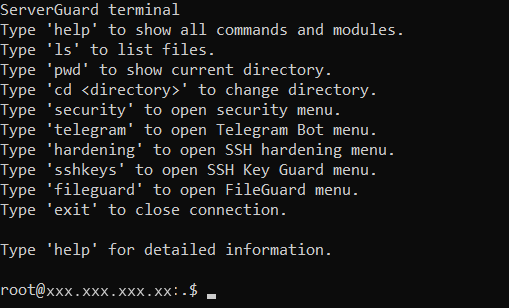
Connected over SSH · modules opened from the terminal
security
telegram
hardening
sshkeys
fileguard
exit
One console for your Linux servers.
ServerGuard runs on Windows and manages Linux servers over SSH. Detection and protection run as background services on the server itself, so they keep working whether or not your computer is switched on.
- Windows application ServerGuard desktop client
- SSH connection Remote session to the host
- Linux server Managed target host
- Protection modules Operate in the background
- Windows client, Linux servers — connect to any Linux server reachable over SSH.
- Protection runs on the server — modules are installed on Linux and operate independently of the client.
- Starts automatically — modules integrate with the Linux system manager and can restart after a reboot.
- Layered by design — each module handles its own class of events instead of one catch-all rule.
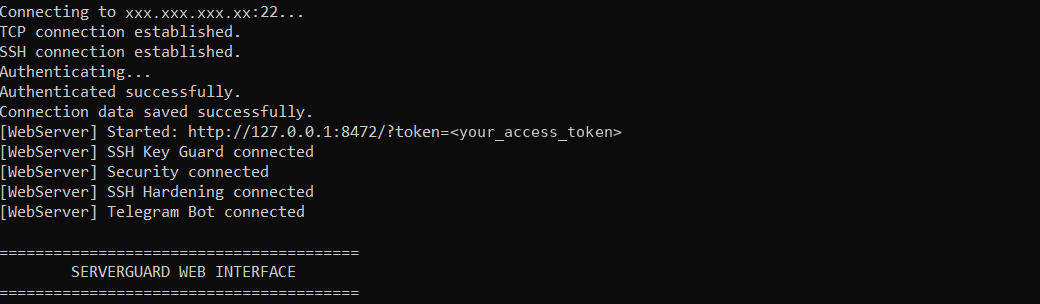
SSH authentication and installed module status
Built from focused, layered modules.
Every module targets one class of events and is managed from the same SSH connection.
Brute-force Protection
The Security module watches SSH authentication, counts failed logins per source and automatically restricts addresses that pass the configured threshold.
- Counts failed SSH authentication attempts per source
- Applies a firewall block when the threshold is reached
- Supports temporary and permanent blocking and a whitelist
========================================
 ServerGuard Security
========================================

 1. Install / enable protection
 2. Start protection
 3. Stop protection
 4. Disable automatic startup
 5. Check status
 6. Show logs
 7. Update Security
 0. Back
Feature overview
Five focused modules, each documented in detail and managed from one SSH connection.
Brute-force Protection
Counts failed SSH authentication attempts per source and applies a firewall block when the configured threshold is reached.
Read the Security docs →SSH Hardening
Reviews and applies a controlled OpenSSH policy in a separate configuration fragment, with validation, backup and rollback.
Read the Hardening docs →SSH Key Guard
Monitors authorized_keys for all users, detects added or removed keys and records structured security events.
Read the SSH Key Guard docs →FileGuard
Integrity monitoring for SSH, sudoers, systemd, cron and other critical configuration. It reports changes — it does not block or restore them.
Read the FileGuard docs →Telegram Bot
Sends security notifications to Telegram and supports remote management of blocks, the whitelist and server status.
Read the Telegram docs →Terminal reference
Session and module commands available in the ServerGuard terminal.
Install, connect, enable protection.
The workflow is the same for every server: install the Windows application, connect over SSH, then enable the modules you need.
Install ServerGuard
Download the installer, run the setup wizard on your Windows computer and start ServerGuard.
Connect over SSH
Enter the server IP address, SSH port, username and password — or another supported authentication method — and connect.
Enable protection
Open a module from the terminal and enable the protection you need directly on the server.
Configuration is stored on the server, so protection continues while the client is closed. See the testing guide for a step-by-step walkthrough of each module.
Keep unwanted access away.
ServerGuard monitors SSH activity and gives you the tools to respond to suspicious access attempts without reading logs by hand.
-
SSH brute-force detection and blocking Counts failed logins per source and applies a firewall block.Active
-
SSH configuration hardening Reviews and applies a controlled OpenSSH policy.Config
-
SSH authorized-key monitoring Detects added or removed keys in authorized_keys.Monitor
-
Critical file integrity monitoring Reports changes to important configuration files.Monitor
-
Telegram security notifications Delivers events to Telegram and allows remote management.Notify
Protection where the servers are.
ServerGuard keeps the management interface separate from the protection itself. The Windows client controls the modules, while detection and response run on the Linux server.
- Modules run on the Linux server, not on the Windows client.
- Protection keeps running while your computer is offline.
- Services start again together with the system.
- Each module reports its own events back to ServerGuard.
Conceptual visualization of ServerGuard's protection model — not live data.
Security alerts wherever you are.
Connect the ServerGuard Telegram bot to receive important server security notifications without constantly watching your server.
Open TelegramWhat's happening in ServerGuard.
Releases, security tests and development updates from the project.
Protect your server.
Download ServerGuard for Windows or Linux and start managing your Linux server over SSH.